h0me // threads
the threads are for me and you. engage with the original post, or post something YOU want to talk about related to the thread.
games / tech outdoors / guns automotive cooking stuffgames / tech
< back to h0me threadsGames, emulation, old hardware, PC parts, gadgets, bad ports, good ports, controller nonsense, troubleshooting, and tech projects.
This post will be edited with new info as time goes on. Good answers, useful links, working fixes, parts lists, notes, and anything worth saving from the discussion will get added up here.
Windows XP on Windows 11
I used this video as the base for my setup: Windows XP on Windows 11. Keep this page open while you watch it. I followed most of the video, but some parts are outdated now, and I changed or replaced a few other things. These notes are placed in roughly the same order as the video so you can check them as each part comes up.
When he first sets up ExplorerPatcher, follow along with most of what he does, but leave File Explorer’s control interface set to the Windows 11 command bar. Do not switch it to the Windows 7 command bar, and do not completely hide the search bar when he brings that up later. He removes those because the Quero Toolbar is supposed to replace them later but that toolbar no longer works (that part can be skipped 13:13-18:28).
When he gets to the XPLuna11 theme section, the link he provides is dead, and also, all those theming steps he did don't work on Windows 11 25H2 anyway. This is why we use Stardock WindowBlinds. Also use ClassicSounds-v18.5.2.exe and Enable-Disable drive space indicator.
After running ClassicSounds-v18.5.2.exe, open the Windows sound settings and set Start Windows, Windows Logon, and Windows Logoff to (None). Leaving all three enabled makes the sounds pile on top of each other, and Windows 11 also plays some of them too early when using the Classic Logon Shell.
For the startup sound, download XPLogin.ps1 and Xp start.wav. Keep XPLogin.ps1 and Xp start.wav in the same folder. Create a task in Task Scheduler that runs XPLogin.ps1 whenever a user logs on. The script waits so the XP startup sound plays while the desktop is loading instead of immediately when Windows signs in.
To correct some OpenShell text colors while using WindowBlinds, install SkinStudio. Open your active WindowBlinds skin in SkinStudio, select the active variant, then go to Edit Controls → Edit Toolbar controls → Button (6 State) → Text. Change Text light/dark to OS default, then apply the skin.
When he gets to Windhawk, install the mods he uses, but also install Classic Explorer navigation bar. This is important for getting WindowBlinds to work properly with File Explorer, and it is required if you want to use my XP Task Pane mod below.
When he gets to the FindeXer task pane setup, you have two choices. You can follow his instructions and make the fake task pane with FindeXer, or you can use my XP Task Pane Beta further down this page. Read the README included with my mod before installing it.
When he gets to the XP volume and network indicator you can use the ones shown in the video, or use my Modern XP Flyouts below. Mine retain some Windows 11 functionality but are designed to look like they belong on Windows XP.
When he gets to the classic programs from his XP virtual machine section. You can also grab the XP notepad.exe and put that in the System 32 folder to replace the Windows 11 version the same way he does it for XP Task Manager.
I did not follow the browser recommendations in the video. I use Firefox 128 ESR with the Namoroka theme. I also use Resource Hacker to open firefox.exe and replace the icon groups containing the modern logo with this old Firefox icon.
Modern XP Flyouts


I have a download below for both of these programs. The first one is 3RVX-Enhanced which already includes the XP skins from The Jackal in the above tutorial, but more importantly, gives you the option to change each programs volume and exclude programs. The next program is XP Network, this doesn't have as many features as Network Activity Indicator, but it gives you a flyout thats like the the Windows 11 WiFi version, for WiFi and Ethernet, all while looking like it belongs on Windows XP. This also includes different XP skins.
XP Task Pane Beta

This is my Windows XP Task Pane mod for File Explorer. Read the README included in the zip before starting.
Modern apps with old skins
If you do not want to use old versions of some apps from the tutorial, modern versions of some programs still support old themes or skins.
VLC
VLC media player
VLC skins
VLC old versions
If you want the old defaults, find the version you want and take the default.vlt.
Winamp 5.9.2
Winamp 5.9.2 release
Winamp skins archive
Windows Media Player Legacy
Search for Optional Features in Windows Settings, click View features, then search for windows. Windows Media Player Legacy should appear there.
Skins archive: Windows Media Player Skins Archive.
USB Floppy Drive
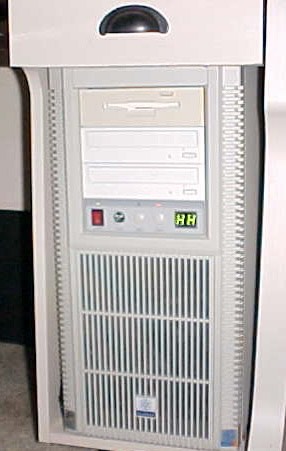
I tested five different USB floppy drives while putting this together, and they do not all act the same.
Before installing the drive permanently, test the USB floppy drive on the exact USB plug or adapter you plan to use. Some drives work fine when plugged into a motherboard USB header through an adapter. Some only want to work from the rear USB ports on the motherboard. Some are stubborn and only seem happy on USB 2.0, or through USB-C with an adapter.
Getting the drive working once can sometimes make it less picky later. After a drive has been detected and used successfully, it may start working through an extension cable or a different USB plug. Do not count on every drive acting the same way even if they’re the same exact model.
The drive carrier has a side hole on each side for M3 screws. These are used to pinch the USB floppy drive in place from the sides, with nuts on the inside. USB floppy drives are not all the same size, so this gives you a little bit of adjustment.
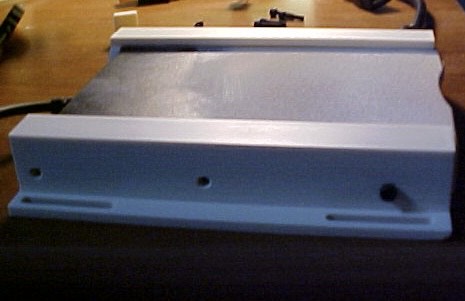
Depending on the USB floppy drive you use, you may also need to remove the rubber feet from the bottom of the drive if it sits too high in the carrier.
Before screwing the carrier into the 5.25 bay, test the whole thing by hand. Make sure the floppy disk slides in and ejects easily. With a disk inserted, make sure the carrier button can press the actual floppy drive eject button.
Also make sure the carrier button is not already pressing on the floppy drive button while you are trying to read a disk. If there is too much pressure on the eject button, the disk may not seat all the way inside the drive, and then the drive will not read it.
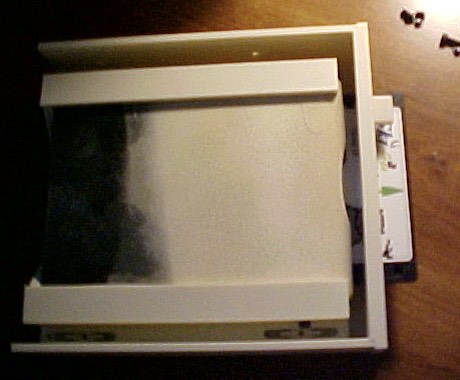
Once everything lines up correctly, install the carrier into the PC like a normal optical drive. Use the same screws you would normally use for a 5.25-inch bay device, usually M3x5 or M3x6.
Print Notes
I printed mine with 3 walls, 15% gyroid infill, and a brim.
The floppy drive light area is a very thin wall. If you turn on detect thin walls in the slicer, it should cover that area up. If you leave detect thin walls off, it should stay open for the drive light.
I also used fuzzy skin to make the part look a little less 3D printed and cover seams left from the light cut out if you choose to detect thin walls. In Bambu Studio, my settings were 0.07 mm thickness, 0.07 mm point distance, Perlin noise type, and painted-on fuzzy skin applied to the face of the drive carrier.
outdoors / guns
< back to h0me threadsOutdoors and guns: builds, parts, gear, range trips, optics, lights, slings, camping/fishing stuff, pictures, questions, and practical notes.
This post will be edited with new info as time goes on. Good answers, useful links, working fixes, parts lists, notes, and anything worth saving from the discussion will get added up here.
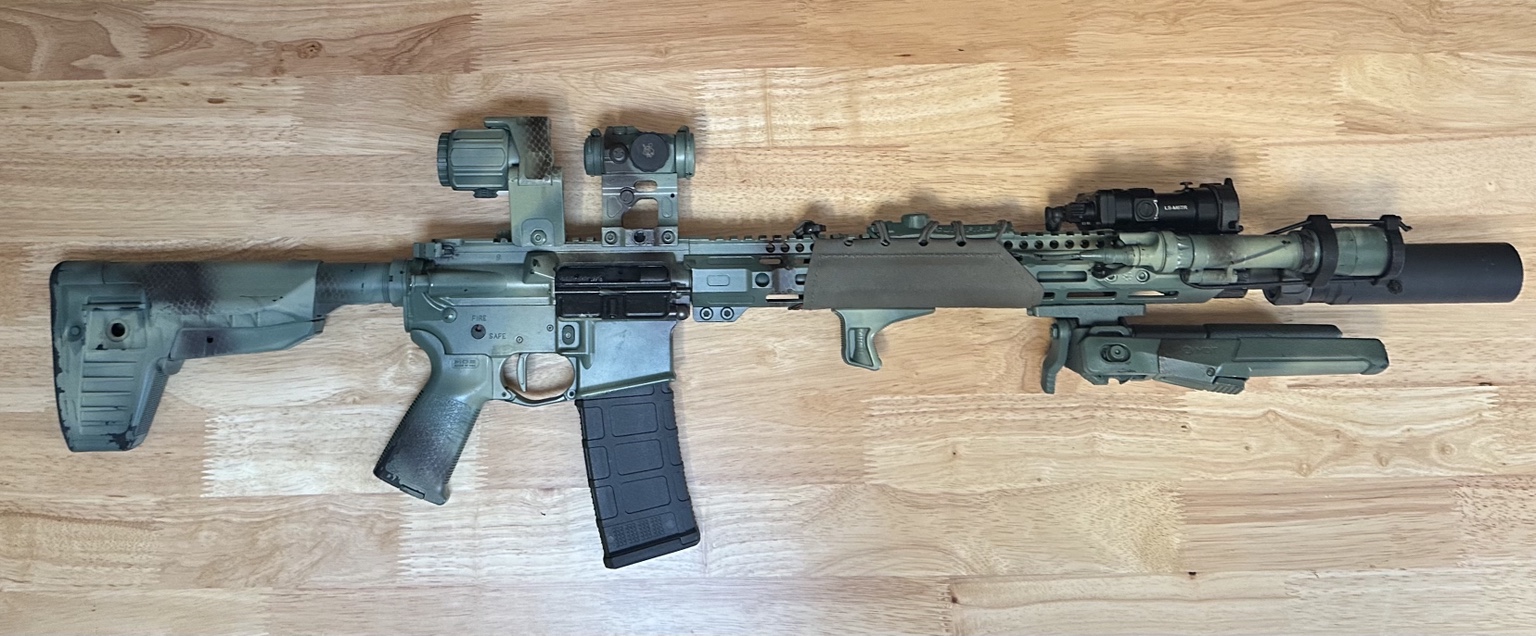
I have rifles that I built the lowers, then bought Daniel Defense, Sons of Liberty Gun Works, and Bravo Company Manufacturing uppers on sale. Ends up costing $1000-$1300. $1000 cheaper than buying the full gun from each of these companies and what I recommend doing if you have the money.
But the rifle here cost $600 (then when I bought a suppressor I bought other parts to accommodate that and a different stock). If you don’t want to build an upper yourself a gunsmith will do it for like $50.
KAK upper with Midwest industries rail and AO precision bolt carrier group.
PSA lower with magpul furniture
LaRue MBT2 trigger
Any combination of KAK, Midwest industries, Rosco, Ballistic advantage parts and PSA lower parts are your friend for building from scratch. Make sure the barrel is 4150 CMV. Skip their bolt carrier groups and triggers for an AO precision or microbest BCG and LaRue MBT2 trigger.
Prices obviously don't include accessories.
automotive
< back to h0me threadsCars, trucks, repairs, maintenance, tools, parts, weird noises, upgrades, detailing, buying advice, and whatever else belongs in the garage.
This post will be edited with new info as time goes on. Good answers, useful links, working fixes, parts lists, notes, and anything worth saving from the discussion will get added up here.
cooking
< back to h0me threadsFood, recipes, kitchen tools, meal ideas, cooking experiments, cheap eats, prep tricks, and anything worth saving after people try it.
This post will be edited with new info as time goes on. Good answers, useful links, working fixes, parts lists, notes, and anything worth saving from the discussion will get added up here.